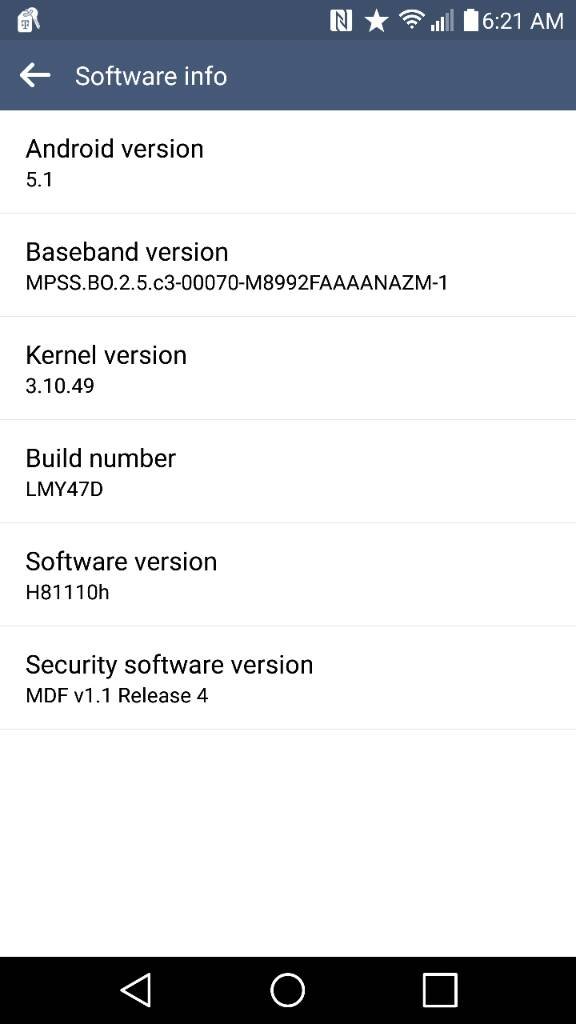
T-Mobile LG G4 has received a mandatory update that will update the phones existing software version to 10h (H81110h). The build number is LMY47D and the OTA update size is 174.1 MB. T-Mobile confirmed that there would be no UI changes and its just a software stability update. If your T-Mobile LG G4 is running the older version 10d then you can update to 10h.
Pre-Requisites
Update T-Mobile LG G4 To Android 5.1.1 LMY47D H81110h OTA Firmware
Via OTA
Prepare the phone
Install LG Drivers : Click Here
Install LG Support Tool : Download
Connect Device and Start Update
You have successfully updated your T-Mobile LG G4 to latest android 5.1 LMY47D H81110h.
Source : T-Mobile USA | Image Credit
Pre-Requisites
- Your T-Mobile LG G4 should be running H81110d software version.
- You will need a Wi-Fi connection otherwise mobile data will be used.
- Atleast 50% or higher battery life.
- Available memory (File size 174.10 MB).
Update T-Mobile LG G4 To Android 5.1.1 LMY47D H81110h OTA Firmware
Via OTA
- Go to "System settings > About phone > Software info".
- If an update is available then follow the on screen instructions to download and install it.
Prepare the phone
- Fully charge the battery.
- Save any important data before updating the software on your device. Any data not saved on a micro SD card or PC may be erased (contacts, images, etc.).
- Remove the micro SD card.
- Ensure device "Mass storage only" mode is NOT selected.
Install LG Drivers : Click Here
Install LG Support Tool : Download
Connect Device and Start Update
- Connect your phone to your PC using the USB cable included with your device.
- Do not tap "Turn on USB storage" on your phone screen.
- Do not disconnect the USB cable until the update is complete.
- If you experience errors, ensure "Mass storage only" is not checked, check USB connection, or try another port.
- Click Start Updating in the LG Mobile Support Tool.
- When update is complete the LG Mobile Support Tool will display Update complete.
- The phone will turn off then turn on. Once the phone is powered on, the LG Mobile Support Tool will display the current software version. It is now OK to disconnect the USB cable from the phone.
You have successfully updated your T-Mobile LG G4 to latest android 5.1 LMY47D H81110h.
Source : T-Mobile USA | Image Credit



0 komentar:
Posting Komentar